How to Compress PDF Online for Free (Without Losing Quality)
Mitigate digital bloat across textual scripts, digitized folios, geometric schematics, and chromatic folios through bespoke structural compression.
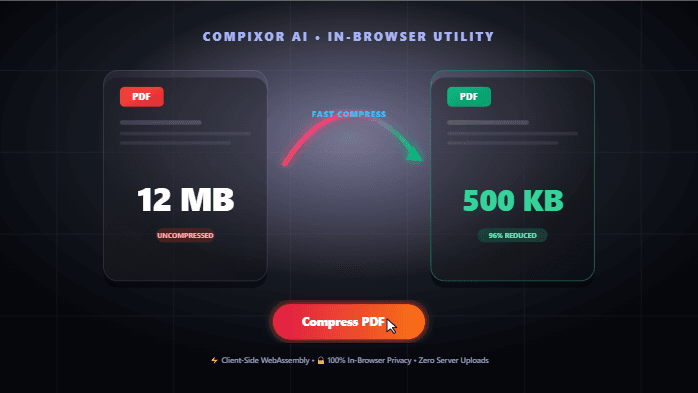
Client-Side Utility
Execute this tool right now in your browser
Need to execute an immediate PDF compress operation? While many professionals default to an everyday PDF compressor online such as Smallpdf, iLovePDF, or 11zon, truly optimal file attenuation hinges upon document morphology. Upload your asset to Compress PDF and calibrate your reduction profile based on whether your container encapsulates selectable unicode glyphs, rasterized paper facsimiles, photographic plates, or parametric vector paths.
The Underlying Causes of Disproportionate Document Magnitudes
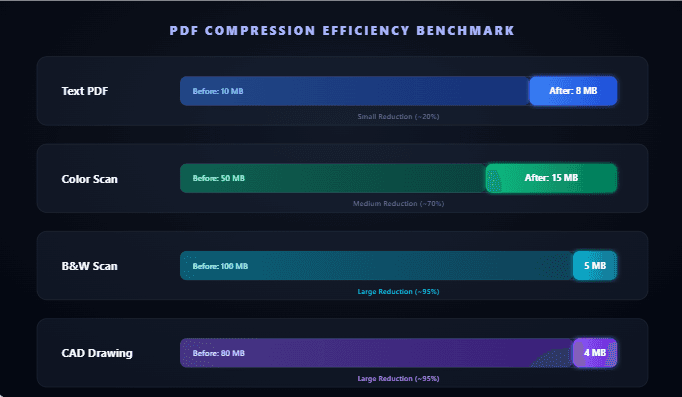
A single-page PDF can occupy a modest 50 KB or command a massive 50 MB footprint. The variance stems entirely from internal compositional anatomy. Whether you benchmark against an enterprise Adobe Acrobat workflow or seek an unrestricted client-side tool, understanding internal topography prevents futile repetitions of low-yield compression cycles. Expected Yields: Text (10–30%) | Scans (60–98%) | CAD Vectors (60–85%)
| Content Topology | Typical Footprint / Page | Compression Elasticity |
|---|---|---|
| Pure typography (zero imagery) | 20–100 KB | Low (10–30%): inherently compact |
| Text with dispersed figures | 200 KB – 2 MB | Moderate (30–60%) |
| Full-color optical scan (300 DPI) | 2–8 MB | High (60–85%) via MRC decomposition |
| Monochrome binary scan | 1–5 MB | Extreme (95–98%) via JBIG2 dictionary encoding |
| CAD/Vector blueprints | 5–50 MB | Substantial (60–85%) post-rasterization |
Scenario 1: Truncating Curricula Vitae and Executive Summaries for Email Dispatch
Enterprise gateways enforce strict 2 MB attachment limits, yet your portfolio spans 5 to 10 MB. This is caused by unoptimized photographic portraits, logotypes, and analytical charts embedded at 300 DPI print fidelity when display rendering demands only 150 DPI.
- Remediation Protocol: Ingest the file into Compress PDF, select Basic compression, and retrieve an output that is typically 50–70% smaller.
- Viewport Optimization: Basic attenuation downsamples high-frequency pixel matrices to viewport-optimal densities while preserving clean vector outlines, font subsets, structural cross-references, and interactive inputs.
- Targeting Strict Thresholds: When institutional portals require a specialized PDF compressor to 200KB or 100KB, compress the file first. If extra volumetric bloat lingers, convert color graphics to grayscale using Black White PDF before running a secondary compaction pass.
Scenario 2: Compacting Digitized Contracts, Receipts, and Archival Binders
A 50-page scanned legal agreement can swallow 120 MB because each page functions as an unmediated photographic capture (a standard 300 DPI A4 page consumes roughly 25 MB uncompressed). Remediation depends on whether chromatic fidelity is mandatory:
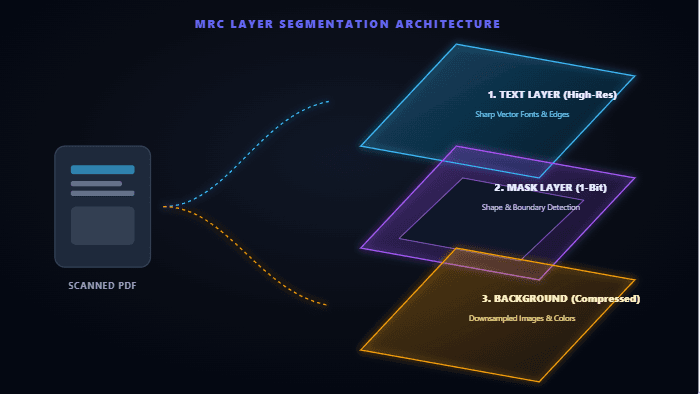
- Monochrome Facsimiles (Agreements, Codices, Forms): The JBIG2 codec identifies recurring typographical characters, cataloging them into a single reference dictionary instead of storing redundant bitmaps for every letter. Strip chromatic data via Black White PDF, then compress. A 120 MB scan frequently contracts to just a few megabytes while retaining pristine legibility.
- Chromatic Scans (Periodicals, Brochures, Official Credentials): When hue accuracy is critical, Mixed Raster Content (MRC) algorithms segment each page into 3 distinct visual layers: Foreground Layer (high-res binary mask isolating text edges), Background Layer (downsampled continuous-tone imagery), and Selector Mask (compositing mask). Designate Strong compression for deep file reduction, or choose Basic to preserve fine photographic gradients (60–85% decrease).
Scenario 3: Streamlining Vector-Dense CAD Schematics
An exported architectural blueprint stalls viewers with an unwieldy 40 MB footprint because vector structures render every stroke, arc, contour, and geometric annotation as raw mathematical instructions. Pure mathematical vectors contain little perceptual redundancy for traditional compression algorithms to eliminate.
- The Workaround Pipeline: Convert coordinate vectors into high-resolution raster images, then compress the underlying pixel grid: [ Vector PDF ] ➔ Rasterize PDF ➔ Black White PDF ➔ Compress PDF ➔ [ Optimized File ].
- Step 1 - Rasterize: Use Rasterize PDF to render vector coordinates into a unified bitmap grid at your target DPI.
- Step 2 - Desaturate: Run Black White PDF, as technical diagrams rarely require chromatic depth.
- Step 3 - Compress: Process the file through Compress PDF for consistent reductions of 60–85%. The schematic becomes a flat, non-editable raster image that remains legible for review and storage.
- Important Safeguard: Rasterization is an irreversible process. Never discard your original vector master.
Scenario 4: Batch Processing Homogeneous File Clusters and Consolidations
Managing hundreds of incoming invoices? The process works cleanly in bulk. When concatenating multiple records via PDF Merge, ensure that prior to or immediately following the consolidation, you run a unified compression profile across the entire document batch:
- Simultaneous Ingestion: Upload your batch simultaneously into Compress PDF.
- Profile Alignment: Select the compression profile that matches the entire set.
- Consolidated Download: Download the finished files together in a consolidated ZIP archive.
- Archival Standardization: Running monochrome records through Black White PDF before final compression delivers the smallest possible file sizes.
Quick Reference: Document Compression Workflows
Select the optimal multistep pipeline based on your target file profile:
| Document Profile | Step 1 | Step 2 | Step 3 | Projected Contraction |
|---|---|---|---|---|
| Text dossier, report, eBook | Compress (Basic) | — | — | 10–30% |
| Monochrome scan, legal brief | Black White PDF | Compress PDF | — | 95–98% |
| Color brochure, credential | Compress (Strong) | — | — | 60–85% |
| CAD drafting, blueprint | Rasterize PDF | Black White PDF | Compress PDF | 60–85% |
| Image-dense document | Compress (Basic) | — | — | 40–60% |
| Composite layout | Compress (Strong) | — | — | 50–70% |
How to Use in 3 Simple Steps
Select PDF
Upload or drag your heavy document into the client-side compressor.
Pick Reduction Profile
Select Basic, Strong, or Custom downsampling based on your document topology.
Download Compact PDF
Save your optimized document instantly from device RAM with up to 90% size reduction.
Experience How to Compress PDF Online for Free (Without Losing Quality)
Zero file uploads, no watermarks, and no sign-up required. Your files remain completely secure in device RAM.
Launch Tool in Browser